Cursor to private company deploy
Built in Cursor. Private company deploy on Croft.
Build is easy. Private deploy, company login, and a real database are the cliff. Croft is that host: one private server, full-stack apps with the database included, company login across apps, backups and rollback.
7-day free trial•Solo from $24/mo annual•Team $99/mo annual
Quick answer
Built in Cursor → connect Croft over MCP → deploy to your private croft → colleagues open it behind company login. The database, backups, and rollback come with the host. You do not assemble auth, a separate database, and a VPS for every internal tool.
The path
From Cursor to a link your team opens.
Private host with the database and company login already on the floor.
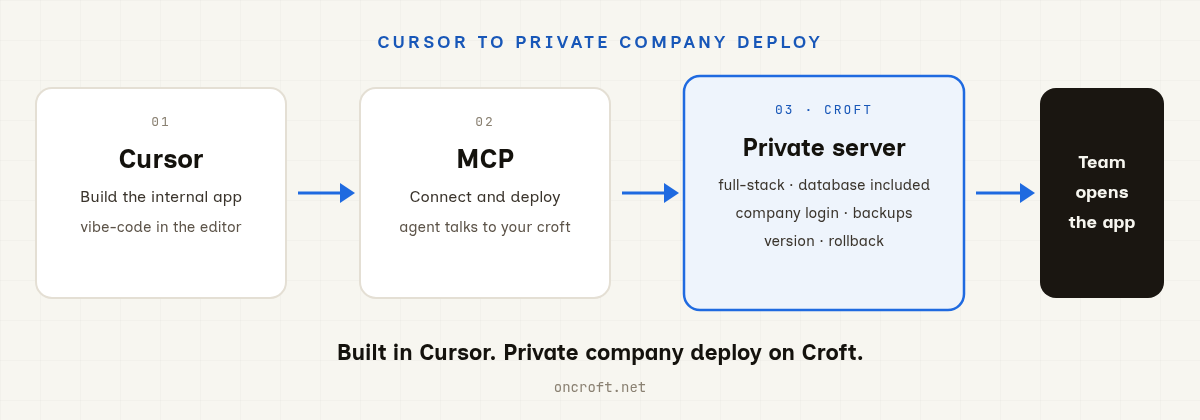
Cursor → MCP → private Croft (full-stack + database + company login) → team uses the app.
Why Croft
Private full-stack, not a public preview.
The parts that make an internal tool real for your company.
Full-stack with a database included
UI, server code, and an app database (SQLite) on one private server. No separate Postgres product or connection-string project for a typical internal tool.
Company login across many apps
One login in front of the apps on your croft. Access is per app. Ship one tool, then grow a small set without a new auth project each time.
Backups and rollback built in
Continuous backups and one-click rollback when an AI change goes wrong. Colleagues keep working against shared data that persists.
Stay in Cursor
Add Croft over MCP, authenticate, ask the agent to deploy. Croft Build is optional if you want a browser path too.
Compare
Vercel for public. Croft for private full-stack.
Pick the host that matches the job.
| Croft | Vercel | |
|---|---|---|
| Best when | Internal tools your company must keep private | Public sites and preview deploys |
| Database | Included with the private host for typical apps | Separate product / wiring for data-backed apps |
| Access | Company login across apps on one server | Public by default; Passport can add IdP in front |
| Ops extras | Backups and rollback on the platform | Strong CDN and preview workflow |
Use Vercel when the app should be public or preview-first. Use Croft when colleagues need a private full-stack tool with data and company login.
How to start
Four steps from editor to team link.
Get a croft
A private server for your workspace. Trial takes minutes.
Build and deploy
Refine the internal app in Cursor, then ask the agent to ship it. Optional: Croft Build in the browser.
Invite colleagues
They open the link, sign in with company login, and use shared data that persists.
What you might ship
Internal apps your company actually runs.
FAQ
Frequently asked questions
I built an app in Cursor. Where should it live if it has to stay private?
Croft. Connect Cursor over MCP, deploy to your private server, and the app sits behind company login before its code runs. You get a database, backups, and rollback with the host. Built for internal tools your colleagues open every day, not a public preview URL.
Do I need a separate database?
No. Croft includes an app database (SQLite) with the deploy. You do not provision Postgres, wire a separate database product, or manage connection strings for a typical internal tool. Full-stack means UI, server, and data on one private server.
How is this different from Vercel + Passport?
Vercel is strong for public and preview deploys. Vercel Passport can put your IdP in front of deployments. Croft is for private full-stack apps: database included with no extra DB setup, many internal apps on one server behind one company login, plus backups and rollback built in.
Can I use Codex or VS Code too?
Croft connects over MCP. That path works today with Cursor, Claude, and ChatGPT (and other MCP clients). GitHub Copilot in VS Code has its own connect guide. If your tool speaks MCP, point it at your croft the same way. You can also use Croft Build in the browser without an editor MCP.
How does Cursor talk to Croft?
Over MCP. Add the Croft server in Cursor (one click from your dashboard), sign in, and the agent can create apps, write files, and deploy to your croft. Setup lives on the Connect Cursor page.
How much does it cost?
Solo from $24/month on annual billing, Team $99/month on annual. 7-day free trial, no card to start.
Stake out your croft.
Your team's first app could be live before lunch.
Get your croft7 days free, no card to start. From $24/month - cancel anytime and take everything with you.